
Subscribe to our calendar
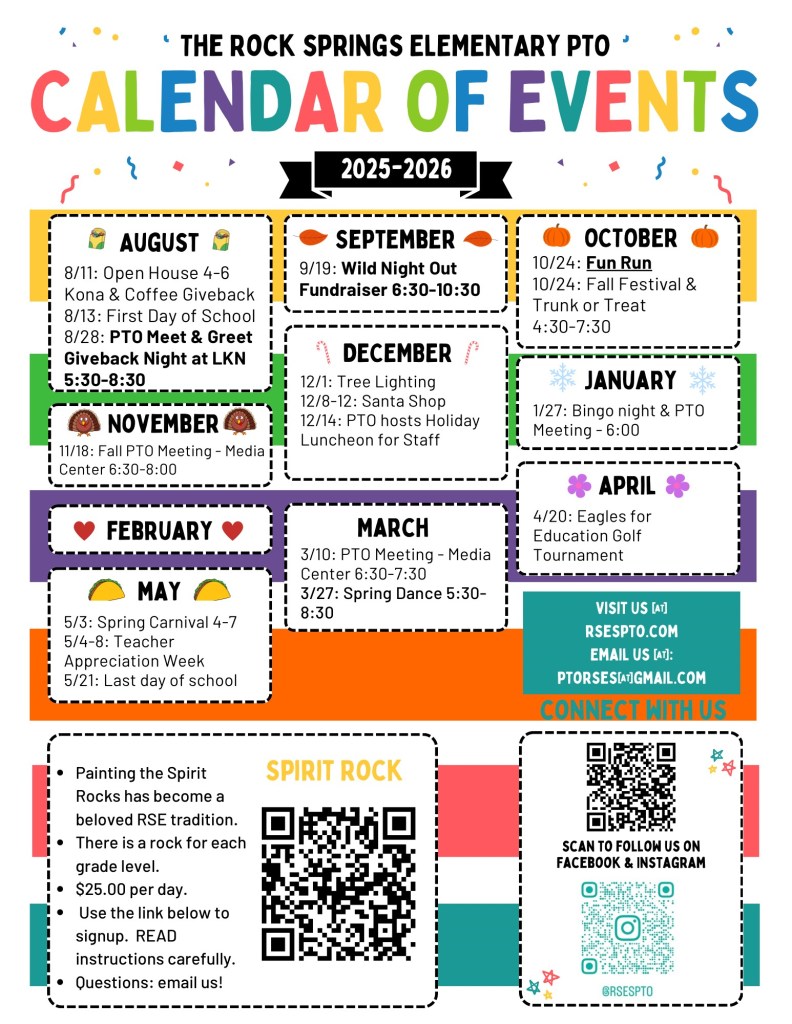
Never miss an event or find yourself thinking “I didn’t know about that!” by subscribing to our RSES PTO Calendar.
What to expect when you subscribe to our calendar:
Event name, time, address of event, and even a convenient link to the event website with everything you need to know! Did we mention reminder notifications on Sundays (ONLY) to help you prepare for the week ahead?
How to Subscribe IF you use a Google Calendar:
Click the Google Calendar Link below. When you click this link, you will be prompted to subscribe to our calendar. You can click “Add” to add the calendar to your Google Calendar.
How to Subscribe IF you use an Apple Calendar:
Click the Apple Calendar Subscription Link below. When you click this link on your mobile device, you will be prompted to subscribe to our calendar. Once you click “Subscribe”, you are provided a couple options to select based on your preferences of how the calendar subscription will appear in your calendar. Once you finish those selections, you click “Add” at the top right corner.
RSES Apple Calendar Subscription Link
 Rock Springs Elementary School PTO